If you just picked up the new DJI Osmo Action 6, you know it’s a powerhouse for 4K video. However, to get the best performance out of this camera, you need a microSD card that can keep up. Using the wrong card can lead to recording errors, dropped frames, or even lost footage.
In this guide, I’m breaking down the official DJI recommended memory card list and sharing my experience with the card I’ve been using with zero problems.
Watch the Full Video Guide
In the video below, I walk through the official DJI support specifications and compare the specs and current value of the best available cards to help you make the right choice.
Watch: DJI Osmo Action 6 Recommended Memory Cards
Official DJI Recommended MicroSD Cards
The DJI Osmo Action 6 officially supports microSD cards with capacities up to 1TB. For high-bitrate 4K recording, DJI recommends cards that meet the U3, A2, and V30 specifications.
According to the official support list, these are the two cards that DJI recommends: the Lexar Professional SILVER PLUS series and the Kingston Canvas Go! Plus series. Both offer a full range of sizes from 64GB all the way up to 1TB and are specifically designed to handle the high-speed data writing required for action cameras.
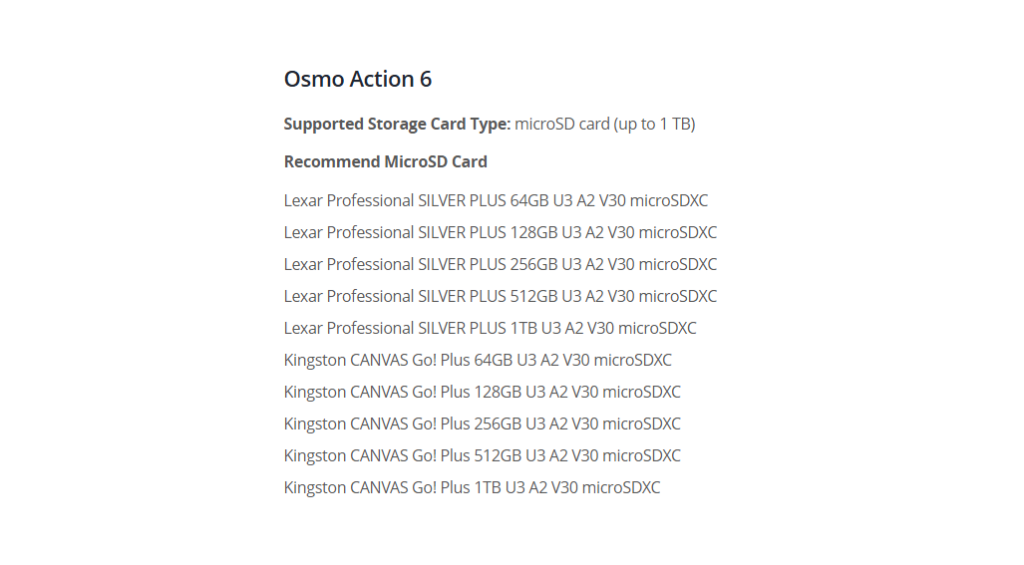
🔗 Official DJI Support List: You can find the full list of compatible cards on the Official DJI Support Page here.
The Card I Use & Recommend
After testing different options, I have been personally using the 256GB Kingston Canvas Go! Plus in my DJI Osmo Action 6. It has been incredibly reliable with zero recording errors, even when shooting at high bitrates. During my pricing comparison, both the Kingston and the Lexar SILVER PLUS offered great value, but the Kingston has been my “go-to” for daily use.
🛒 Get the Gear (Affiliate Links):
- Kingston CANVAS Go! Plus: Check Prices on Amazon
- Lexar Professional SILVER PLUS: Check Prices on Amazon
- DJI Osmo Action 6 Camera: Check Prices on Amazon
Real-World Recording Time Breakdown
One of the most important things to know before you buy is how much footage you can actually fit on your card. When shooting in High Bitrate Mode with a 256GB card, here are the recording times you can expect on the Osmo Action 6:
- 1080p at 30fps: You can expect about 14 hours and 26 minutes of footage.
- 4K at 30fps: This drops to approximately 7 hours and 4 minutes.
- 4K at 60fps: For high-action shots, you’ll get about 5 hours and 37 minutes.
Final Thoughts
Don’t risk your adventure footage by using an old or slow microSD card. Stick to the official DJI recommended list to ensure your Osmo Action 6 performs perfectly every time you hit record. Whether you go with the Lexar or the Kingston, making sure you have a V30 rated card is the key to success.
For more tech tutorials and gear reviews, make sure to subscribe to the Northern Viking Everyday YouTube channel!