If you’ve picked up the new DJI Osmo Nano, you already know it’s a powerhouse of a camera! 🚀 But there is one technical detail that can be a bit confusing for new users: backup storage.
Watch the full video here: DJI Osmo Nano Recommended Memory Cards 🎥
Unlike many other cameras, the Osmo Nano records directly to its internal storage first. 📥 To get your footage off the camera and onto your computer, you use the Vision Dock to offload that data onto a microSD card. Because this process is so critical to your workflow, choosing a compatible, high-speed card isn’t just a suggestion—it’s a necessity! ⚡️
Internal vs. External Storage: What You Need to Know 💾
The Osmo Nano supports microSD capacities up to 1TB, but not every card is created equal. In my guide, I take a deep dive into the two major series DJI officially recommends:
- Kingston Canvas Go! Plus 👑
- Lexar Professional SILVER PLUS ✨
To see the compatible sizes for these cards and others, here is the official list from DJI. 🔗
Real-World Usable Space 📏
One thing I really wanted to show you is the actual usable storage space you get. Numbers on a box are one thing, but what do you see when you actually plug it in?
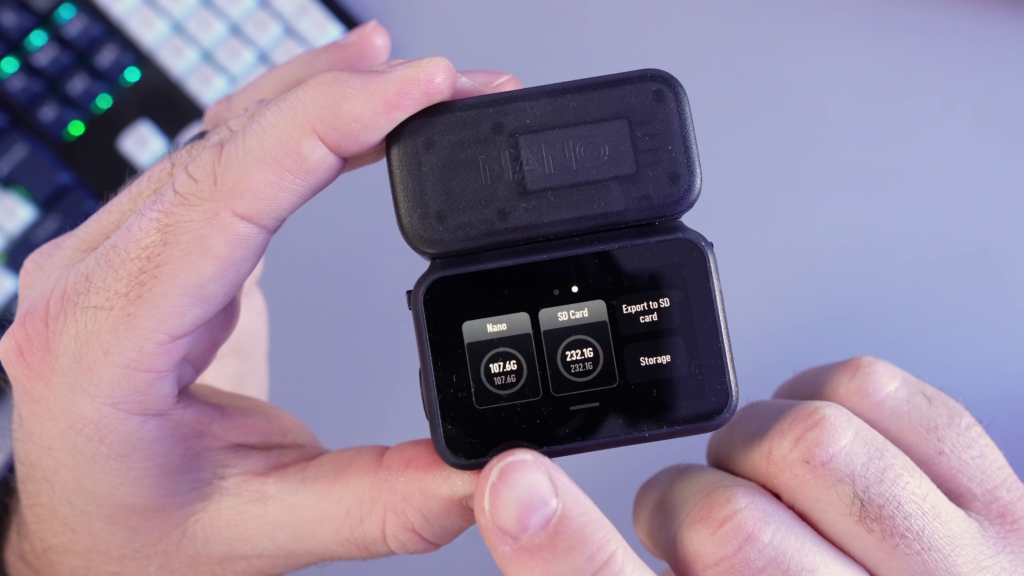
- On my 128GB DJI Osmo Nano, I have 107.6GB of usable internal recording space.
- When offloading to my 256GB Kingston Canvas Go! Plus card, the Vision Dock shows 232.1GB of usable backup space.
I’ve been using that 256GB Kingston card personally, and I’m happy to report I’ve had zero issues with speed or reliability! ✅
Where to Buy the Recommended Cards 🛒
If you want to ensure your footage is safe and your offloads are fast, these are the cards you should be looking at. You can check the current pricing for the different sizes here:
- Kingston CANVAS Go! Plus (Various Sizes) – View on Amazon 🔗
- Lexar Professional SILVER PLUS (Various Sizes) – View on Amazon 🔗
- DJI Osmo Nano Action Camera – View on Amazon 🔗
As an Amazon Associate, I earn from qualifying purchases.
Final Thoughts & Full Video Guide 🎬
Don’t risk your hard-earned footage by using a card that hasn’t been tested for this system. Stick to the official DJI support list to ensure your Vision Dock offloads work every single time.