Do you want Google Chrome to automatically open whenever you start or restart your Windows 11 computer? Chrome includes a simple setting that lets you launch the browser automatically when Windows starts.
In this tutorial, I’ll show you exactly where to find the setting, how to turn it on, and how to confirm that it’s working.
Watch the video tutorial:
https://youtu.be/m5QqozghgG0
How to Make Chrome Open Automatically When Windows Starts
Step 1: Open Google Chrome Settings
Start by opening Google Chrome on your Windows computer.
Click the three dots in the top-right corner of Chrome.
From the menu that appears, select Settings.
Step 2: Open the On Startup Settings
Once Chrome Settings opens, you’ll see several options along the left-hand side.
Select On startup.
This opens Chrome’s startup settings, where you’ll find several options controlling what happens when you launch the browser.
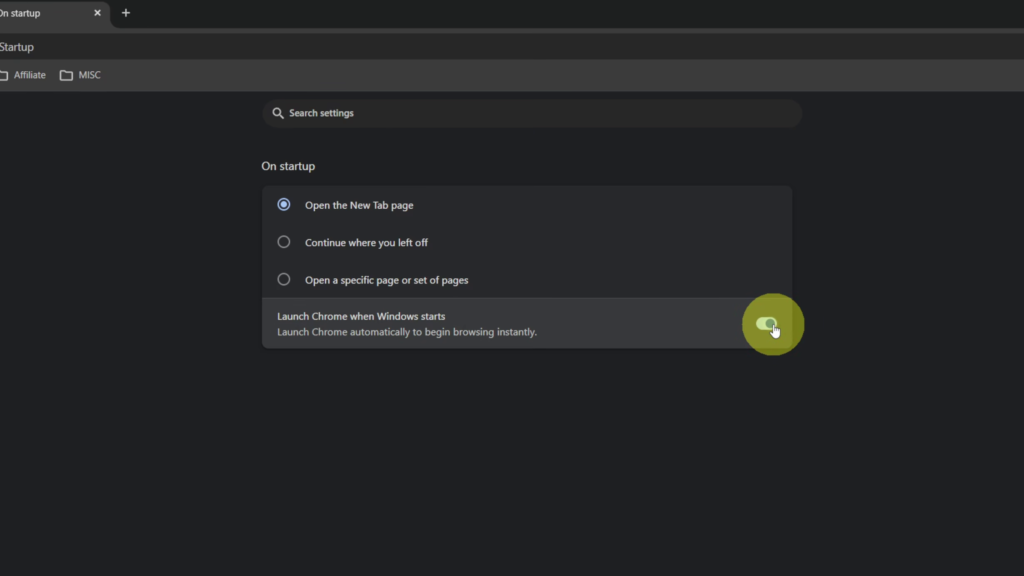
Step 3: Turn On Launch Chrome When Windows Starts
At the bottom of the On startup settings, look for:
Launch Chrome when Windows starts
You’ll see a toggle switch to the right of this option. Click the toggle to turn it on.
Step 4: Restart Windows
Once you’ve enabled the setting, you don’t need to do anything else inside Chrome.
In the video, I restart the computer to demonstrate the setting. After Windows starts back up, Google Chrome automatically opens.
And really, it’s that simple to have Google Chrome launch automatically whenever you start or restart your Windows computer.
Watch the Full Tutorial 🎥
How to Make Google Chrome Open on Startup in Windows 11
https://youtu.be/m5QqozghgG0
Insert your full YouTube thumbnail here and link the image to the video.
Related Google Chrome Tutorials 💻
How to Turn On Vertical Tabs in Google Chrome
https://northernvikingeveryday.com/turn-on-vertical-tabs-google-chrome/
How to Save a Webpage as a PDF in Google Chrome
https://northernvikingeveryday.com/save-webpage-as-pdf-google-chrome/
How to Add a Google Translate Button to Your Chrome Toolbar
https://northernvikingeveryday.com/how-to-add-google-translate-button-chrome/
How to Enable the Google Lens Shortcut in Chrome
https://northernvikingeveryday.com/how-to-enable-google-lens-chrome-toolbar/