Want to install Google Chrome on your Mac? Whether you’re switching from Safari or simply prefer using Chrome, installing it only takes a few minutes.
In this tutorial, I’ll show you how to download, install, and launch Google Chrome on your Mac.
What You Will Learn
- 🌐 How to download Google Chrome on your Mac
- 💻 How to install Google Chrome in macOS
- 📂 How to move Chrome into the Applications folder
- 🚀 How to launch Google Chrome for the first time
- 🔑 How to sign in to your Google account (optional)
Step-by-Step Instructions
Step 1: Open Safari, which comes pre-installed on your Mac.
Step 2: Search for Google Chrome and open the official Google Chrome website.
Step 3: Select Download Chrome and allow the download if prompted.
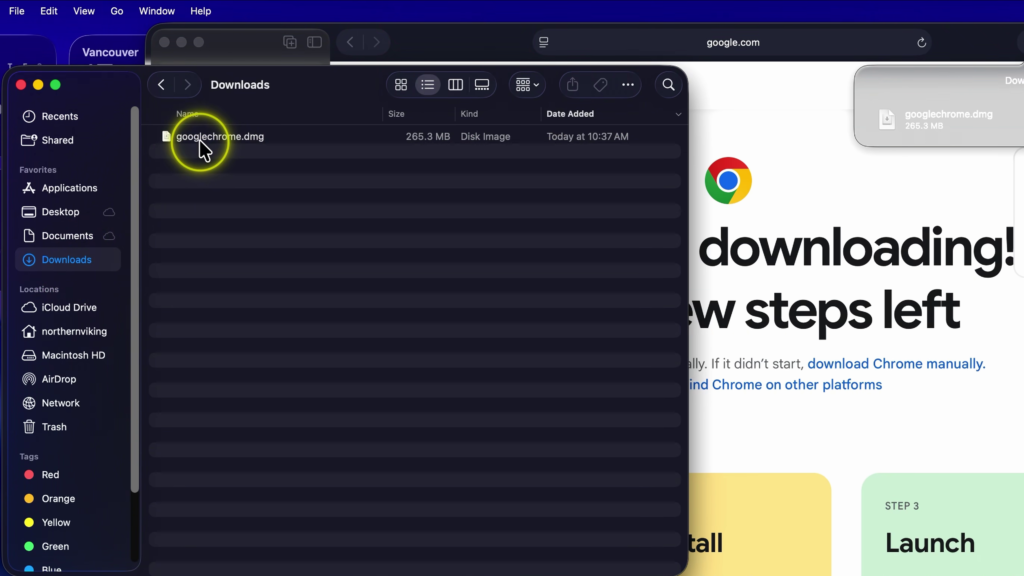
Step 4: Once the download is complete, open the downloaded file from your Downloads folder.
Step 5: Drag the Google Chrome application into the Applications folder to begin the installation.
Step 6: Open the Applications folder and launch Google Chrome.
Step 7: If prompted, select Open to confirm you want to run an app downloaded from the internet.
Step 8: Sign in with your Google account if you’d like to sync your bookmarks, passwords, and browsing history. You can also choose to stay signed out and start using Chrome immediately.
Google Chrome is now installed and ready to use on your Mac.
▶️ Watch the full tutorial here:
https://youtu.be/fAiUkgFkkT8
Related Tutorials
🔹 How to Check Your Mac Specs
https://northernvikingeveryday.com/check-mac-specs/
🔹 How to Turn Off the Login Password on Mac
https://northernvikingeveryday.com/turn-off-login-password-mac/
🔹 How to Turn On Dark Mode on Mac
https://northernvikingeveryday.com/turn-on-dark-mode-mac/
🔹 How to Make the Menu Bar Always Show on Mac
https://northernvikingeveryday.com/make-menu-bar-always-show-mac/
🔹 How to Change the Default Notification Sound on Mac
https://northernvikingeveryday.com/change-default-notification-sound-mac/